$ 33.75
| Required Apps |
•
Sales (sale_management)
• Discuss (mail) • Invoicing (account) |
| Technical Name |
wk_appointment
|
| License | OPL-1 |
| Technical Name |
wk_appointment
|
| License | OPL-1 |
Introduction
The Appointment Management System module enhances Odoo's capabilities by providing a comprehensive solution for scheduling and managing customer appointments. It allows businesses to efficiently organize meetings, assign team members, and ensure timely follow-ups, all within the Odoo ecosystem.
Key Features
Appointment Scheduling: Easily create and manage customer appointments directly within Odoo.
Team Assignment: Assign specific team members to each appointment for better coordination.
Reminder Notifications: Send automated email reminders to customers before appointments.
Status Tracking: Monitor the status of each appointment, including new, pending, and completed.
Reporting: Generate reports to analyze appointment trends and team performance.
Benefits
Improved Efficiency: Streamlines the appointment scheduling process, reducing administrative workload.
Enhanced Customer Experience: Keeps customers informed and reduces no-shows through timely reminders.
Better Team Coordination: Ensures the right team members are assigned to appropriate appointments.
Data-Driven Insights: Provides valuable data to improve scheduling strategies and resource allocation.
Compatibility & Technical Details
Odoo Integration: Fully compatible with Odoo 17.0.
Required Modules: Sales (sale_management), Discuss (mail), Invoicing (account).
License: Odoo Proprietary License v1.0 (OPL-1).
Technical Name: wk_appointment
Installation: Available for installation via the Odoo Apps interface
Odoo Appointment Management System
Schedule Meetings in an Organized way!
Odoo Appointment Management System installs a versatile appointment manager in your Odoo. This module enables you to create customer's appointments, assign receiving member(s) to each meeting, send reminder emails to customers, and much more. It also lets you track and manage each appointment/meeting in Odoo.
Information


Reduce Long Waiting Queues
Need to do a lot of meetings? Are you a Doctor and worried about the long waiting queues?
Fix an appointment for the meetings or patients to reduce the long waiting queues.
The appointment management system also lets you keep track of your time. If you are an Odoo user, then Odoo Appointment Management System is the module that can help you with your appointments/meetings.

Arrange meetings and appointments in Odoo
Do you want to manage your meetings in an organized way?
Odoo Appointment Management System lets you fix appointments in Odoo.
You can approve or cancel them per your availability and mark them done after the meeting.
This module is multi-company compatible.

Reminder Notifications For Appointments
Now send appointment notifications and reminders to the others.
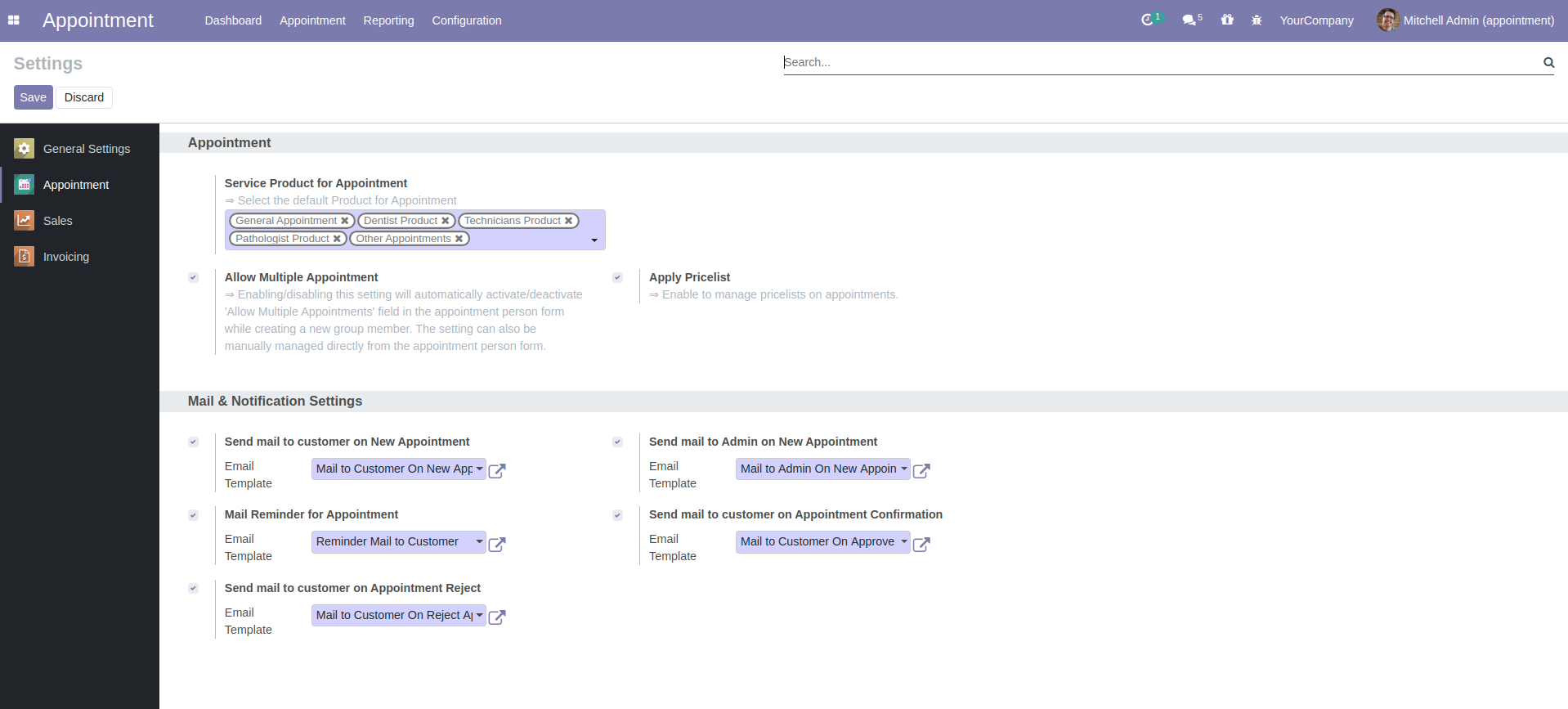
If enabled, the user can send mail notifications after the appointment's confirmation and rejections.
Also, send mail reminders for upcoming appointments to the appointees.

Manage the Charges for the Appointments
To create an appointment, you only need to create a service-type product.
Manage the Appointment Charges from various forms in the module depending upon the users' preference.
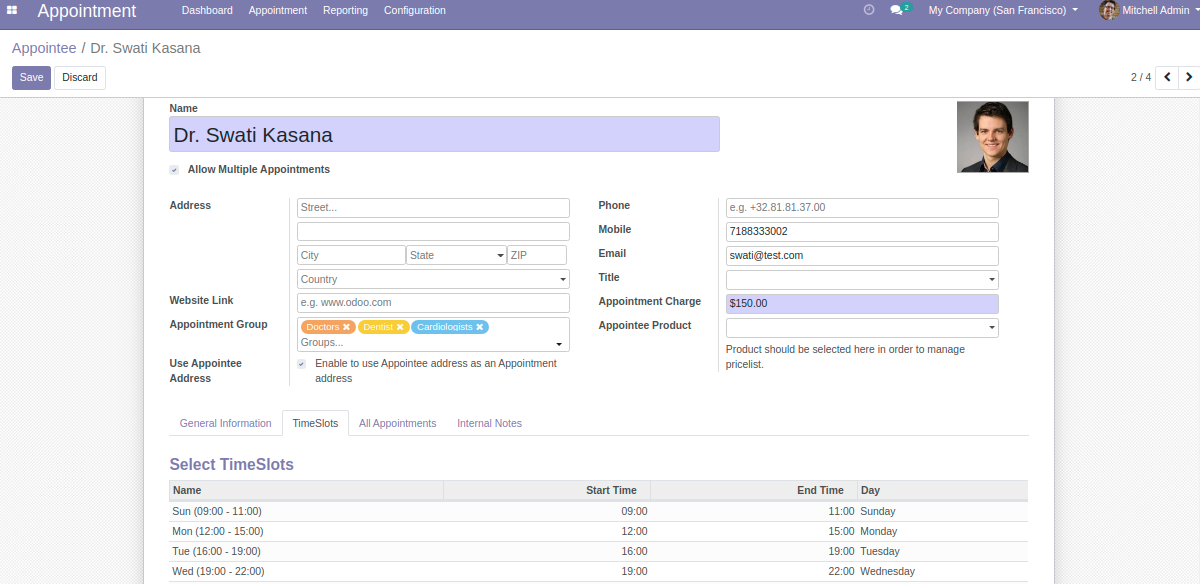
The Appointee allows you to manage the charges according to the individual appointees irrespective of the group.
If appointment charges are assigned to the individual, then the priority is given to individual appointment charges over group charges.
If the individual charges are left zero, the group charges are displayed in the form.

Perks of Odoo Appointment Management System
Helping Doctors to Manage their Appointments Efficiently
Day-to-day doctors have to examine plenty of patients, so Odoo Appointment Management System plays a vital role in managing their appointments.
Now, your patients can ask you to fix an appointment for them so that they can visit you at their time only.
It will reduce the rush in your clinic or hospital; hence, everyone can visit at their booked time.

Helping Professionals to manage their Business Meetings
Odoo Appointment Management System allows you to manage business meetings efficiently.
The one who wants to do a meeting with you can schedule an appointment, and you can approve or decline any appointment/meeting.

Book appointments from the Odoo backend.

Manage and organize clients' appointments/meetings.

Handle daily, weekly, and monthly appointments.

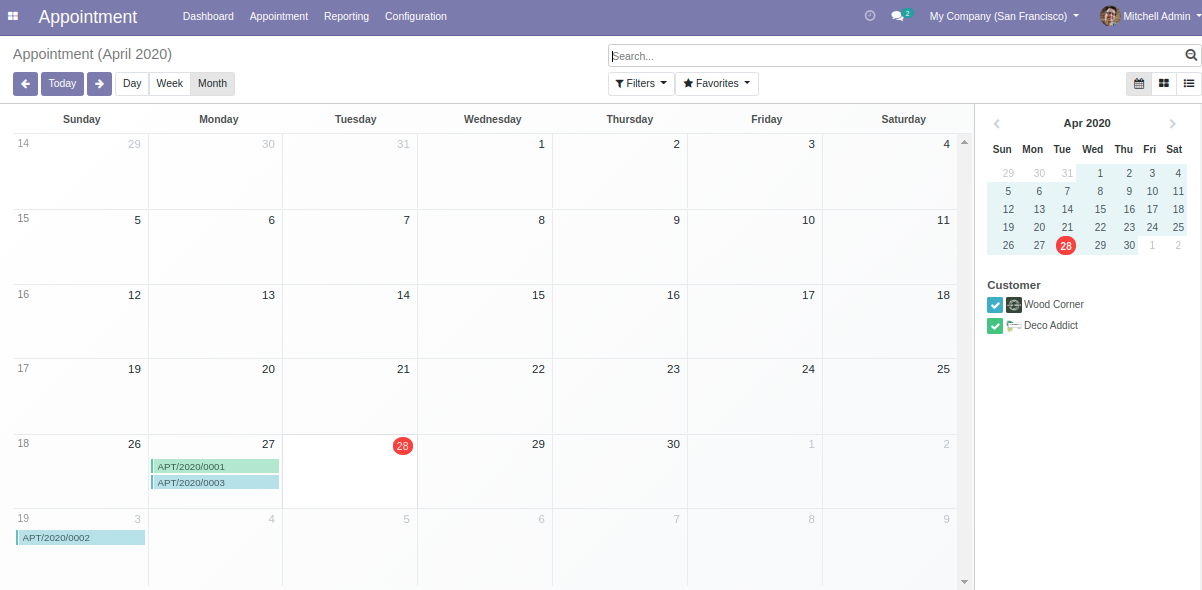
Fully-functional dashboard and calendar view.

Real-time Appointments management through the calendar.

View the list of scheduled appointments with their status.
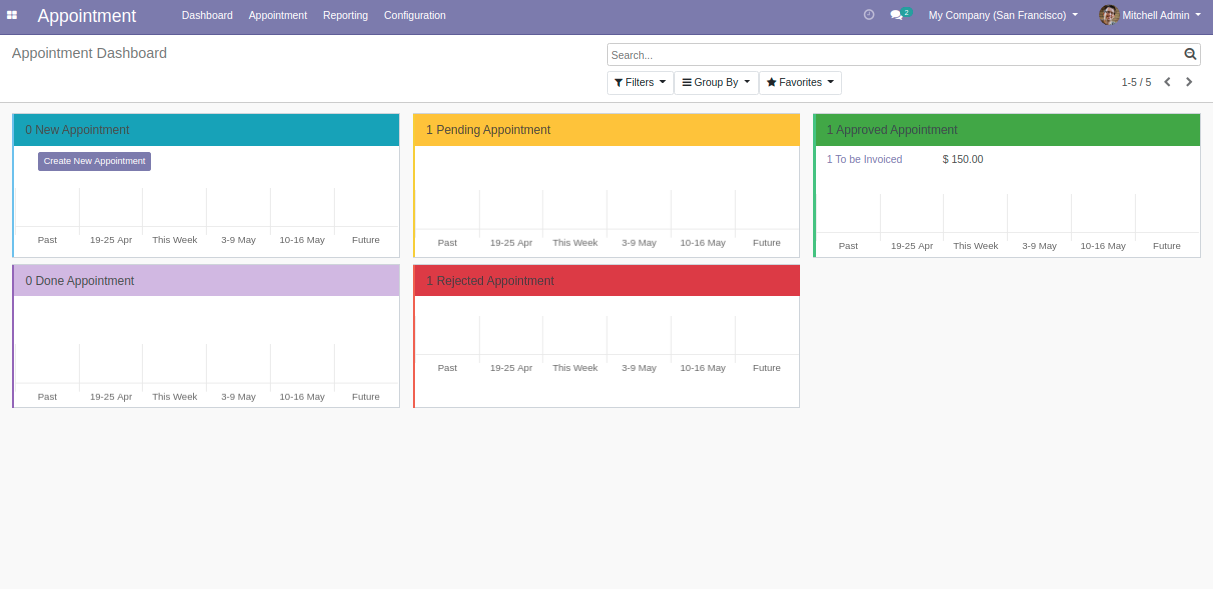
Appointment Dashboard for a quick glance at all the appointments
- View Upcoming Appointments in a calendar view
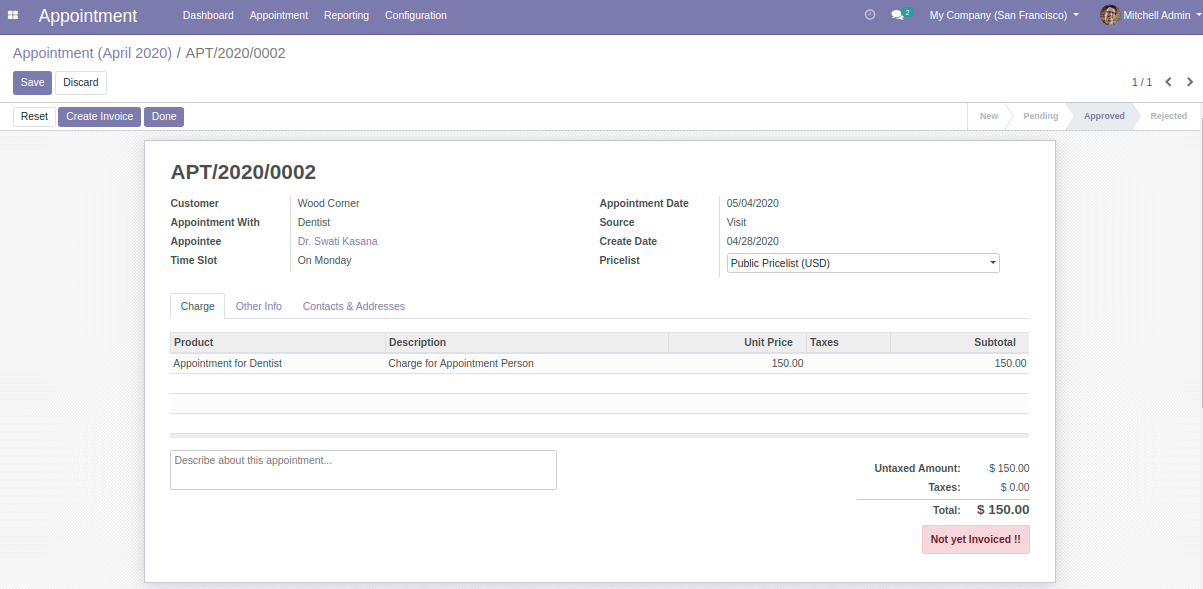
Odoo User can create a new Appointment in Odoo
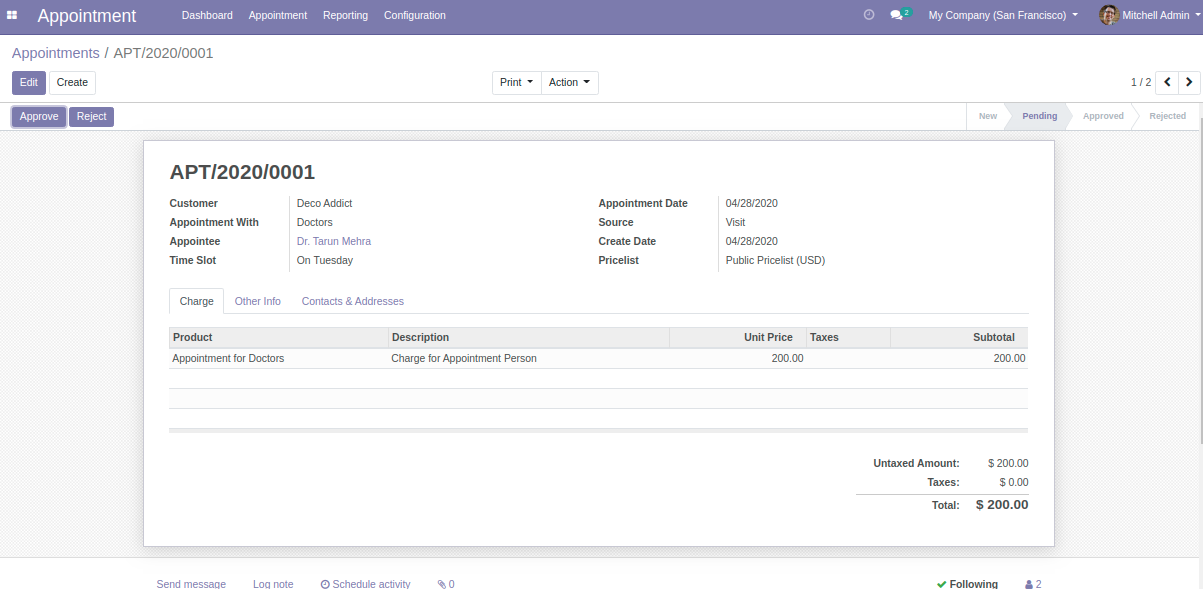
- An Admin can Approve/Reject any Appointment
- Creating an Appointee in Odoo
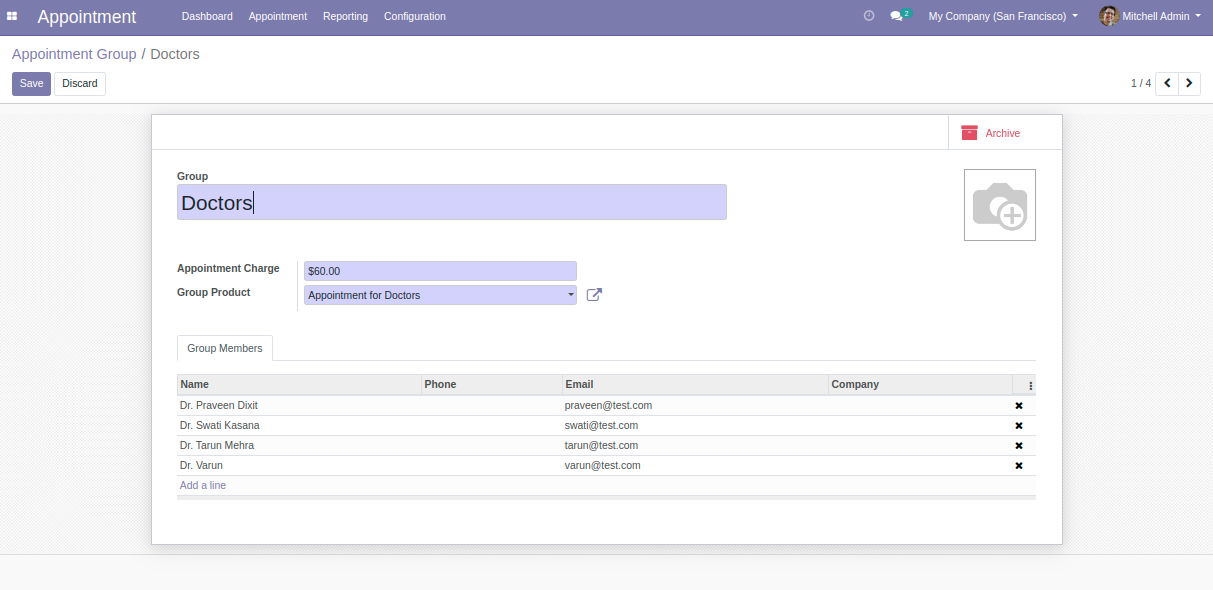
- Add Appointees to a group
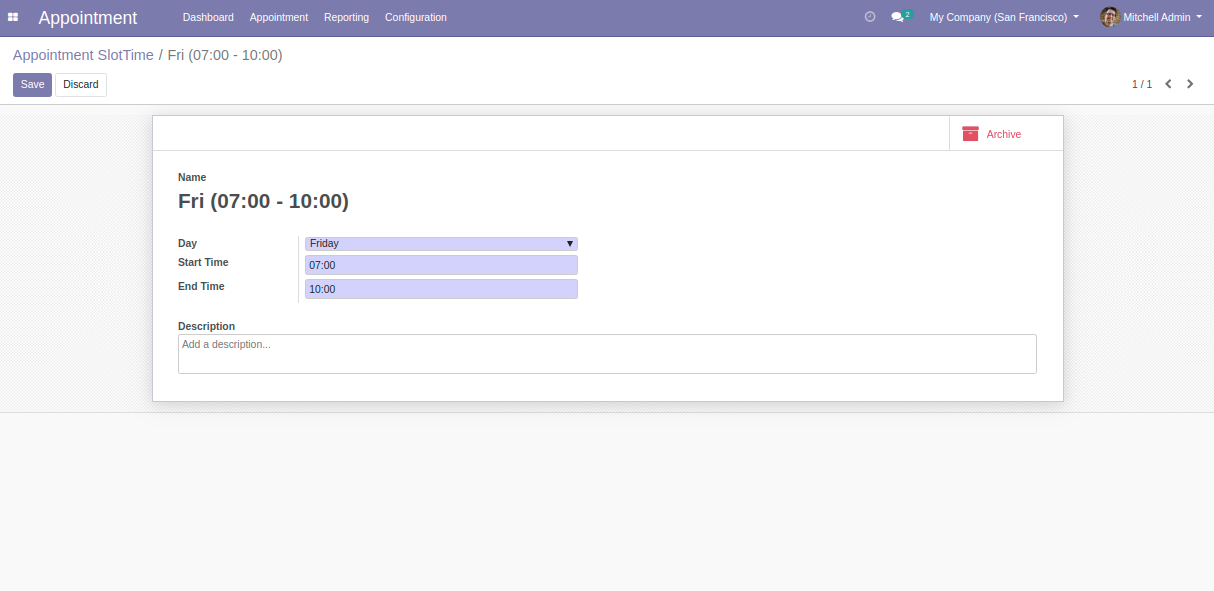
Create Appointment Time Slot
Configure the Appointment Management as you want
Detailed Features List
Arrange Meetings and Appointments
- The module facilitates you to arrange meetings and appointments.
- Users can book an appointment for a customer with an appointed member.
Define Time Slots for the appointment
- Provide a Date and Time slot to a customer after booking an appointment.
- Set the time slots for the selected weekdays.
Dashboard to track Appointment Statuses
- Track the stats of appointments on the basis of weeks.
- View the number of appointments, according to their stages, namely new, cancel, pending, or done.
Set Unique Appointment Charges
- You can set unique appointment charges for each appointee.
- The customers will be charged as per the chosen appointee.
- A user can add the lines in Appointment to apply Charges and taxes in the booked appointment.
Group For the Appointees
- Appointees can be created in Odoo and added to their Groups.
- Create groups for a similar category of Appointment Members.
Approve or Reject Appointments
- Approve/ reject the appointments directly from the appointment form.
- Maintain Appointment Status on each action taken.
Notify Customers for the Appointment
- Provides a Mail Notification facility to send a Reminder before an Appointment.
Print The report of the booked appointments
- Download and print a Report of a booked appointment.
Help and Support
Get Immediate support for any of your query
You will get 90 days free support for any doubt, queries, and bug fixing (excluding data recovery) or any type of issue related to this module.

Write a mail to us:
[email protected]Any queries or want any extra features? Just drop a mail to our support.

Get in touch with our Expert:
https://webkul.uvdesk.com/en/customer/create-ticket/Have any technical queries, want extra features, or anything else? Our team is here to answer all your questions. Just Raise A Support Ticket.
Odoo Proprietary License v1.0
This software and associated files (the "Software") may only be used (executed,
modified, executed after modifications) if you have purchased a valid license
from the authors, typically via Odoo Apps, or if you have received a written
agreement from the authors of the Software (see the COPYRIGHT file).

You may develop Odoo modules that use the Software as a library (typically
by depending on it, importing it and using its resources), but without copying
any source code or material from the Software. You may distribute those
modules under the license of your choice, provided that this license is
compatible with the terms of the Odoo Proprietary License (For example:
LGPL, MIT, or proprietary licenses similar to this one).

It is forbidden to publish, distribute, sublicense, or sell copies of the Software
or modified copies of the Software.

The above copyright notice and this permission notice must be included in all
copies or substantial portions of the Software.

THE SOFTWARE IS PROVIDED "AS IS", WITHOUT WARRANTY OF ANY KIND, EXPRESS OR
IMPLIED, INCLUDING BUT NOT LIMITED TO THE WARRANTIES OF MERCHANTABILITY,
FITNESS FOR A PARTICULAR PURPOSE AND NONINFRINGEMENT.
IN NO EVENT SHALL THE AUTHORS OR COPYRIGHT HOLDERS BE LIABLE FOR ANY CLAIM,
DAMAGES OR OTHER LIABILITY, WHETHER IN AN ACTION OF CONTRACT, TORT OR OTHERWISE,
ARISING FROM, OUT OF OR IN CONNECTION WITH THE SOFTWARE OR THE USE OR OTHER
DEALINGS IN THE SOFTWARE.
